
Gravl's equipment catalog is big, but gyms keep surprising us - that one ancient plate-loaded beast in the corner, or a brand-new machine we haven't cataloged yet. When that happens, add it yourself and your gym profile stays complete.
Add your equipment
- Open your gym profile and tap Equipments.
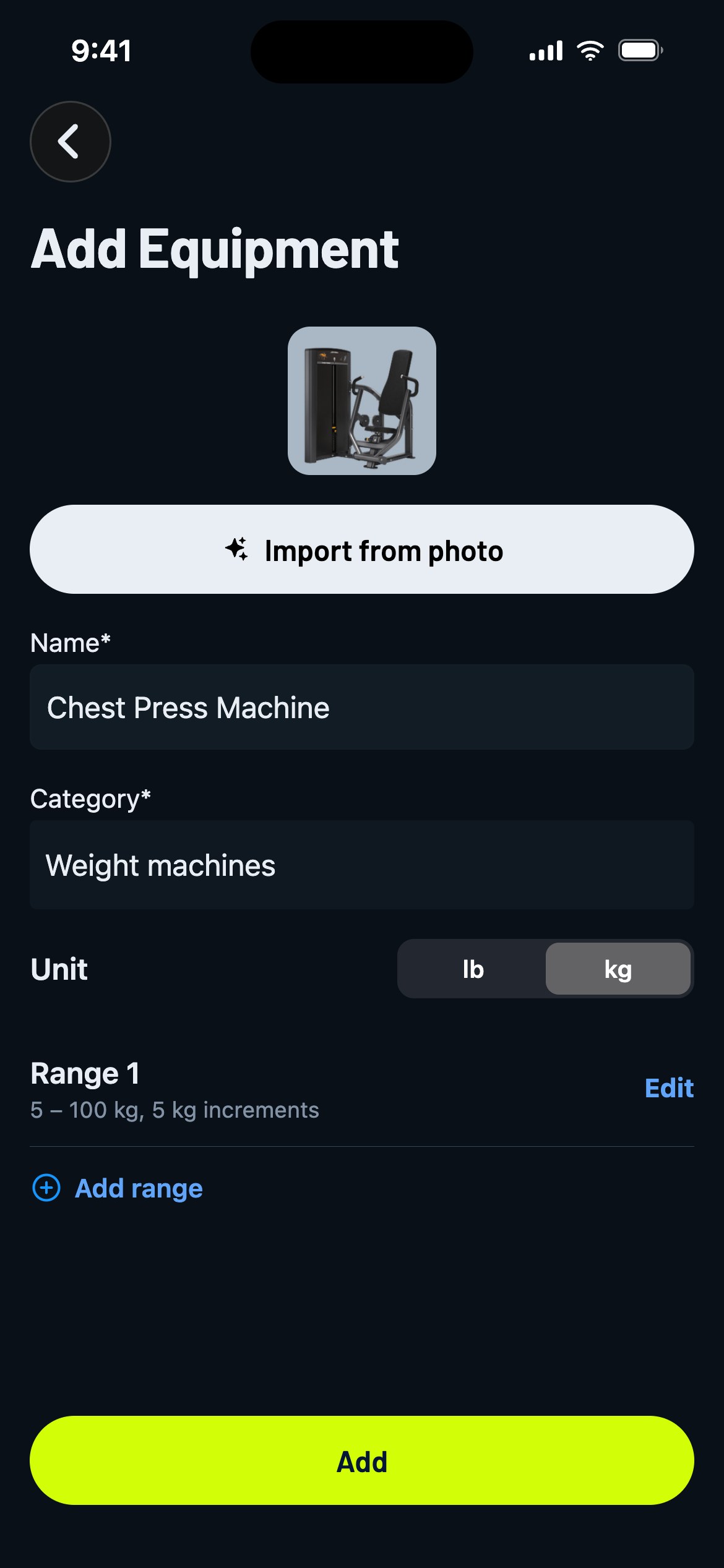
- Tap Add in the top right. The Add Equipment screen opens.
- The fast way: tap Import from photo, take a picture of the machine, and the AI recognizes it and fills in the name, category and photo for you. If Gravl finds similar equipment already in the catalog, it'll ask before creating a duplicate.
- Or fill it in yourself: Name, Category and the Unit its weight stack is marked in (lb or kg).
- If you picked Cable machines or Weight machines, set the weight ranges: what the stack goes from, up to, and in which increments (for example 5 - 100 kg in 5 kg steps). Machines with more than one stack? Tap Add range. Every other category gets a single optional Weight field instead, for pieces with a fixed weight.
- Tap Add. Done!
Right after adding it, Gravl asks if you want to create an exercise that uses your new equipment - so you can go from "unknown machine" to "in my next workout" in one flow. More on that in Create custom exercises.
Gravl Tip:
Getting the weight ranges right is worth the extra 20 seconds: Gravl uses them to recommend weights you can actually select on that machine, increments included.
Good to know
- The photo import needs to actually see gym equipment - if the AI can't recognize any in your picture, it'll tell you (and there's a limit on AI imports, so no spamming the camera).
- There's a cap on how many custom equipments you can create - Gravl will let you know if you reach it.
- You can't delete custom equipment while one of your exercises still uses it. Remove it from the exercise first.